Asphalt Density Calculator kg/m³ and lb/ft³: Convert, Test, and Order
Density is the number that turns a paving plan into a weight on the plant ticket. This asphalt density calculator converts between kg/m³ and lb/ft³, works out density from a core sample, and turns your job size into tonnes or tons. It handles metric and US jobs, with nothing to sign up for. To order by truck loads, use the asphalt tonnage calculator, and for multi-layer builds try the pavement calculator.
- 100% free, no sign-up
- kg/m³, t/m³, and lb/ft³
- Core density test
- Metric and US units
Last updated: October 23, 2026
Convert asphalt density between units
Dense-graded hot mix is about 2,320 kg/m³, which is 145 lb/ft³.
Density from a core sample (ASTM D2726)
Bulk specific gravity is Gmb = A ÷ (B − C). Multiply by 1,000 kg/m³ for density.
Job size and density to tonnes or tons
Standard asphalt density at a glance
For most paving jobs you can start from one figure in the asphalt density calculator above and adjust if your plant gives you something different.
- Dense-graded hot mix compacts to about 2,320 kg/m³, or 145 lb/ft³.
- That is 2.32 tonnes per cubic meter, or about 1.96 short tons per cubic yard.
- Fresh mix settles by roughly 20% to 25% under the roller, so always work from the finished thickness.
- Quality control cores should land at 92% to 97% of the maximum theoretical density.
| kg/m³ | Tonnes per m³ | lb/ft³ |
|---|---|---|
| 2,000 kg/m³ | 2.00 | 124.9 |
| 2,200 kg/m³ | 2.20 | 137.3 |
| 2,320 kg/m³ | 2.32 | 144.8 |
| 2,400 kg/m³ | 2.40 | 149.8 |
Swipe the table sideways to see all columns.
How to use the asphalt density calculator
- Pick the right tab. Use Density Converter to switch between units, Core Density Test to work out density from a core sample, or Tonnage from Density to turn a job size into tons or tonnes.
- Choose your units. In the Tonnage tab, select metric (meters, millimeters, kg/m³) or US (feet, inches, lb/ft³). The density field resets to a standard value for that system.
- Enter the measurements. Type the length, width, and finished compacted thickness. For a core test, enter the dry, saturated surface-dry, and submerged masses in grams.
- Set density and buffer. Standard dense-graded hot mix is 2,320 kg/m³ or 145 lb/ft³. The waste buffer starts at 8%, which suits most simple jobs.
- Calculate and read the result. Press Calculate to see the area, volume, weight, and the quantity to order, or the density and compaction percentage for a core.
What is the density of asphalt in kg/m³?
Compacted density is the mass of hot mix packed into one cubic meter once the rollers are done. Fresh mix is full of air, and that air squeezes out under compaction. The National Asphalt Pavement Association (NAPA) points to proper compaction as one of the biggest factors in keeping water out and avoiding early rutting.
For standard dense-graded hot mix, the working range is about 2,275 to 2,370 kg/m³, with 2,320 kg/m³ (145 lb/ft³) the usual planning number. Other mixes sit lower or higher:
| Mix type | kg/m³ | lb/ft³ | Typical use |
|---|---|---|---|
| Dense hot mix (HMA) | 2,320–2,400 | 145–150 | Roads, parking lots, driveways |
| Warm mix (WMA) | 2,240–2,370 | 140–148 | Long hauls, cooler weather |
| Recycled asphalt (RAP) | 2,160–2,320 | 135–145 | Budget jobs, base layers |
| Cold mix or patch | 1,600–2,240 | 100–140 | Potholes, utility cuts, temporary repairs |
| Porous or open-graded | 1,600–1,840 | 100–115 | Drainage lots, stormwater areas |
Swipe the table sideways to see all columns.
If you want to check a weight against the mix your plant quotes, the hot mix asphalt calculator covers hot mix loads, and the crushed asphalt calculator handles recycled millings. Whichever figure your plant quotes, type it into the asphalt density calculator to see how it changes your order.
Asphalt density calculator metric formulas
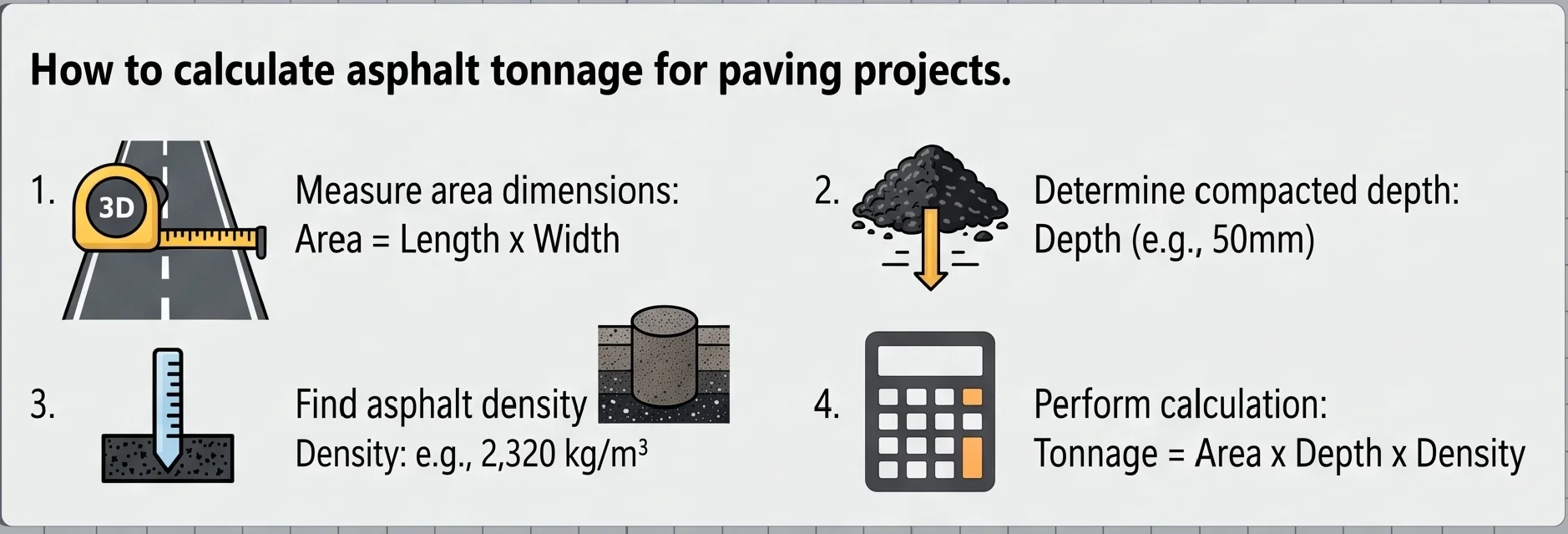
Everything starts from one relationship: weight is volume times density.
Metric (square meters and kg/m³)
Tonnes = Volume × Density (kg/m³) ÷ 1,000
Divide millimeters by 1,000 to get meters, so 50 mm becomes 0.05 m. This is the setup used across the UK, Europe, Australia, and much of Asia.
US (square feet and lb/ft³)
Short tons = Volume × Density (lb/ft³) ÷ 2,000
Converting between the two
1 sq ft = 0.0929 m²
1 tonne = 1.10231 short tons
If you start from drawings in square feet and want a quote in tonnes, our free asphalt calculator square feet page gives both at once. The asphalt density calculator uses these same formulas, so you can run the math by hand to double-check it.
Worked examples
Example 1: residential driveway (metric)
12 m long, 4.5 m wide, 50 mm thick, 2,320 kg/m³.
Volume = 12 × 4.5 × 0.05 = 2.70 m³. Mass = 2.70 × 2,320 = 6,264 kg, or 6.26 tonnes. With an 8% buffer that’s about 6.77 tonnes.
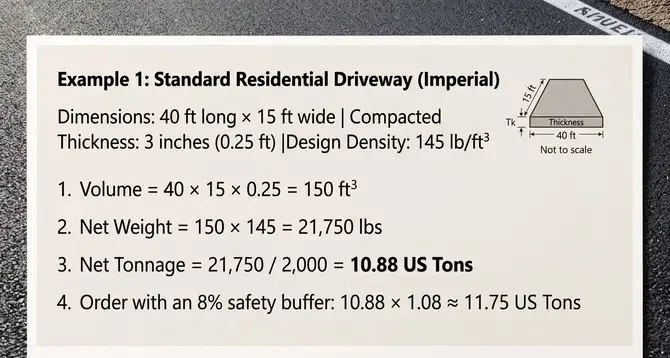
Example 2: delivery bay (US)
40 ft by 15 ft, 3 in thick, 145 lb/ft³.
Volume = 40 × 15 × 0.25 = 150 ft³ (5.56 cu yd). Weight = 150 × 145 = 21,750 lbs, or 10.88 tons. With an 8% buffer that’s about 11.75 tons.
Example 3: a core sample
A core weighs 1,200 g dry, 1,210 g saturated surface-dry, and 700 g submerged, and the mix design gives Gmm = 2.450.
Gmb = 1,200 ÷ (1,210 − 700) = 2.353, so the core density is about 2,353 kg/m³ (146.8 lb/ft³). Percent compaction = 2.353 ÷ 2.450 = 96.0%, inside the usual 92% to 97% window.
Field quality control: core density testing
Inspectors drill cores from the finished mat and test them under ASTM D2726 (AASHTO T 166). Three weights go into the formula:
- A is the dry core in air, in grams.
- B is the saturated surface-dry core in air, in grams.
- C is the core weighed under water, in grams.
Multiply Gmb by the density of water (1,000 kg/m³, or 62.4 lb/ft³) to get density, then divide by the maximum theoretical specific gravity (Gmm) to get percent compaction. Most agencies ask for 92% to 97%. The Core Density Test tab in this asphalt density calculator does all of this in one step.
Asphalt density ton/m³ and coverage per ton
At 2.32 tonnes per cubic meter, here’s roughly how far one ton of delivered hot mix goes at each finished depth:
| Finished depth | Per 1 metric tonne | Per 1 short ton |
|---|---|---|
| 25 mm (1 in) | 17.2 m² | 166 sq ft |
| 50 mm (2 in) | 8.6 m² | 83 sq ft |
| 75 mm (3 in) | 5.7 m² | 55 sq ft |
| 100 mm (4 in) | 4.3 m² | 41 sq ft |
Swipe the table sideways to see all columns.
Short-ton figures use 145 lb/ft³. They come out slightly different from the metric column because a short ton (907 kg) is lighter than a tonne.
Why density and waste both matter when you order
Density sets the weight, but waste decides whether the paver finishes the pass. Base stone has small dips that soak up extra mix, edges roll off where nothing confines them, and hand work around manholes and tie-ins leaves scrap you can’t reuse. A buffer of about 8% suits plain rectangles, and 10% to 15% suits curves and cul-de-sacs. Once the asphalt density calculator has given you a tonnage, the asphalt driveway cost calculator turns it into a budget.
More paving calculators
Short tons to order and truck loads from area and depth.
Multi-layer thickness from subbase to surface course.
Hot mix weights, truck schedules, and laydown depth.
Tack coat volume, binder rates, and emulsion weight.
Tons and cubic yards of recycled asphalt millings.
Turn the tonnage into a full installed budget.
Frequently asked questions
How to calculate the density of asphalt?
Divide the mass of a compacted asphalt sample by its volume. In practice, labs weigh a core dry, saturated surface-dry, and submerged in water, then use those three masses to get the bulk specific gravity and multiply by the density of water.How to check asphalt density?
Crews either drill cores from the finished mat or use a nuclear density gauge. Cores are tested under ASTM D2726 (AASHTO T 166) to get the bulk specific gravity, and the result is compared with the maximum theoretical density. Most specs want 92% to 97%.What is the formula for calculating density?
Density = mass ÷ volume. For a paving takeoff you rearrange it: weight = compacted volume × density, using about 2,320 kg/m³ or 145 lb/ft³ for dense-graded hot mix.What are common mistakes in calculating density?
The usual ones are mixing up loose plant mix with compacted pavement, forgetting that mix compacts by roughly 20% to 25% under the roller, converting between feet, inches, meters, and millimeters wrongly, and leaving out a waste buffer.What is the standard asphalt density in kg/m3?
Dense-graded hot mix asphalt is usually around 2,320 kg/m³ once compacted, which is 2.32 tonnes per cubic meter or about 145 lb/ft³. On real jobs it runs from roughly 2,275 to 2,370 kg/m³ depending on the aggregate and binder content.How do I use an asphalt density calculator with metric and square feet?
Convert the area first: 1 sq ft is 0.0929 m². Convert the thickness to meters, multiply the two to get volume, then multiply by 2,320 kg/m³ and divide by 1,000 for tonnes. The Tonnage from Density tab does this if you switch it to the units you have.How does an asphalt density calculator for kg/m3 work?
It multiplies length, width, and compacted thickness (in meters) to get volume, then multiplies by your density in kg/m³. Divide by 1,000 and you have metric tonnes, with any waste buffer added on top.What is asphalt density in ton/m3?
It is the same number in bigger units. 2,320 kg/m³ is 2.32 tonnes per cubic meter, so a cubic meter of compacted hot mix weighs about 2.32 tonnes.How much area does 1 tonne of asphalt cover?
At 50 mm (2 in) thick, one metric tonne covers about 8.6 m². At 75 mm (3 in) it covers about 5.7 m².Why is compacted density different from loose plant density?
Hot mix leaves the truck loose and full of air. Rollers squeeze the air voids down to roughly 4% to 7%, and the layer settles by about 20% to 25%. That is why you order by compacted volume, not by what you see in the truck bed.Sources and resources
Asphalt Density Calculator: Tonnage, Coverage & QC Testing
Free asphalt density calculator to estimate paving tonnage, square feet coverage, core density (Gmb), and cubic yard conversion with custom waste buffers.
Price Currency: USD
Operating System: All
Application Category: Business Application