Free Pavement Calculator: Square Feet to Tons and Cubic Yards
Enter the length and width, add the thickness of each layer, and this pavement calculator gives you the cubic yards and tons of asphalt, stone base, and subbase for the whole section. It treats the pavement as a stack of layers instead of one slab, so a single set of measurements gives you the order for every truck. Use it as a pavement calculator square feet tool for driveways and parking lots, with a separate tab for concrete slabs.
- 100% free, no sign-up
- Asphalt, stone, and subbase
- Concrete slab tab
- Truck load count
Last updated: October 26, 2026
What does the whole pavement section need?
How much concrete does the slab need?
How far will the material I have go?
How to use the pavement calculator
A paving order has more than one line on it, and it is easy to price only the top one. Work through the layers in this order and you will have every quantity before you call anyone. For a single asphalt layer only, our asphalt calculator is quicker:
- Measure the footprint. Measure the length and width of the area you will pave, in feet. For an L-shaped or curved area, split it into rectangles, work out each one, and add the square footage. Measure the paved area only, not the whole lot.
- Pick a typical section or type your own. The preset menu fills in common thicknesses for a driveway, a car parking lot, or a heavy truck area. You can also type the compacted thickness of each layer in inches. Leave a layer blank if the job does not have it.
- Check the materials. Each layer has its own density. Standard hot mix is 145 lb/ft³ and compacted crushed stone base is 135 lb/ft³. Change them only if your plant or quarry quotes something different.
- Set the buffers. Keep 10% on the asphalt for edges and base dips. For stone, 10% works on firm ground. Soft or uneven ground can take 15 to 20% extra.
- Calculate and read the order. Press Calculate to get tons and cubic yards for every layer, the dig depth, and the number of tri-axle loads. Add prices if you want a material cost.
Why pavement is more than a layer of asphalt
The asphalt you see is the wearing surface. It sheds water and spreads wheel loads, but the strength of a driveway or lot comes from what is under it. If the base is thin or wet, the surface cracks within a few winters no matter how good the mix was. That is why a proper quantity list for a pavement job has a line for the surface, a line for the stone base, and sometimes a third line for subbase when the soil is weak.
Each layer is bought in its own way, too. Asphalt and stone come off a scale and are priced by the ton. Concrete is priced by the cubic yard. The pavement calculator above returns both numbers for every layer, so you can read a quote in whichever unit the plant or quarry uses. If you only want the asphalt for a single layer, the free asphalt calculator square feet tool on our home page does that in four short steps.
| Layer | What it does | Usual compacted thickness |
|---|---|---|
| Asphalt surface (and binder) | Carries wheel loads and keeps water out | 2.5 to 6 inches, in lifts |
| Stone base | Spreads the load and drains the section | 4 to 12 inches |
| Subbase | Bridges soft soil and adds frost protection | 0 to 12 inches |
| Subgrade | The natural ground that must be firm before anything goes on | Not bought, only proof-rolled |
Swipe the table sideways to see all columns.
Typical pavement sections by use
There is no single right thickness. It depends on the soil, the traffic, and what your local agency requires. These are the ranges that come up most often, and they are what the preset menu fills in. For a thick asphalt section, our hot mix asphalt calculator shows how to split it into lifts and what to set on the paver.
| Use | Asphalt | Stone base | Subbase |
|---|---|---|---|
| Residential driveway | 2.5 to 3 in | 4 to 6 in | Usually none |
| Car parking lot | 3 to 4 in | 6 to 8 in | Only on soft soil |
| Heavy truck area | 4 to 6 in | 8 to 12 in | 6 to 12 in on weak soil |
| Concrete slab or apron | Not used | 4 in base | Usually none |
Swipe the table sideways to see all columns.
The math behind the pavement calculator
Every layer uses the same few steps, which is why you can check the result with a phone calculator:
The 324 is 27 cubic feet in a yard times 12 inches in a foot. The density is the compacted weight of the material, which is why the thickness must also be the compacted depth. Dig depth is simply the layer thicknesses added together. If you need the loose depth to set on a paver, use the roller loss steps on our hot mix page instead.
Material densities and coverage
The table shows the weights used in the pavement calculator and how far one ton goes at 3 inches. If your supplier quotes a different density, type their number into a quick check on the asphalt density calculator.
| Material | Compacted weight | Tons per cu yd | Coverage per ton at 3 in |
|---|---|---|---|
| Hot mix asphalt (standard) | 145 lb/ft³ | 1.96 tons | 55 sq ft |
| Warm mix asphalt | 143 lb/ft³ | 1.93 tons | 56 sq ft |
| Crushed stone base (DGA) | 135 lb/ft³ | 1.82 tons | 59 sq ft |
| Gravel or bank-run | 125 lb/ft³ | 1.69 tons | 64 sq ft |
| Ready-mix concrete | 150 lb/ft³ | 2.02 tons | 53 sq ft |
Swipe the table sideways to see all columns.
Stone is the one to watch. A cubic yard of loose crushed stone in the truck weighs less than a cubic yard that has been rolled down to 135 lb/ft³, which is why the stone allowance is a separate setting. If you are working with recycled material, our crushed asphalt calculator covers millings and their lower weight.
Worked examples
These three jobs show how the pavement calculator handles a driveway, a parking lot, and a concrete pad. Each number can be checked by hand.
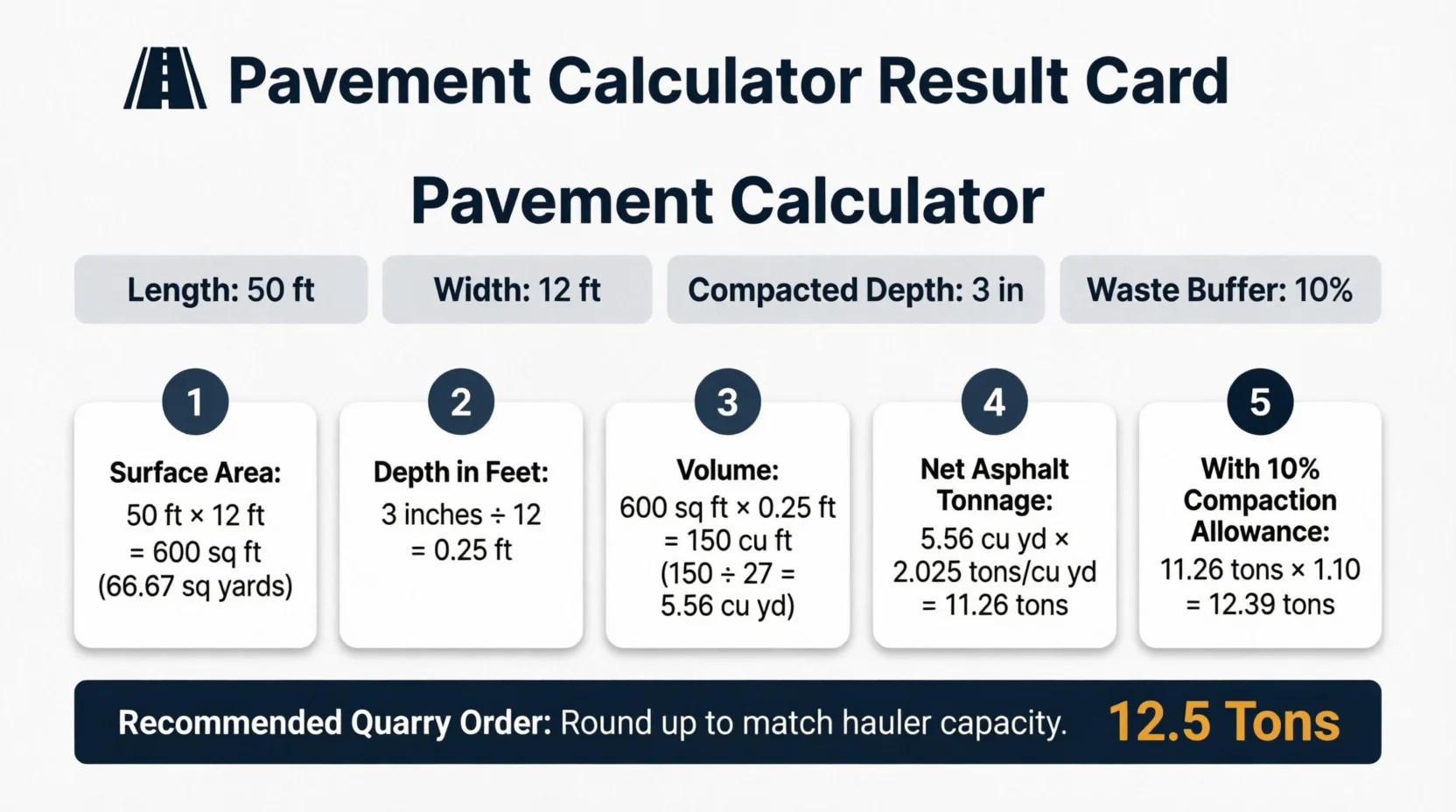
Example 1: driveway, 50 by 12 ft, 3 in asphalt over 6 in stone
Area = 50 × 12 = 600 sq ft. Asphalt: 600 × 3 ÷ 12 = 150 cu ft (5.56 cu yd), which weighs 150 × 145 ÷ 2,000 = 10.875 tons. With a 10% buffer that is 11.96 tons, so order 12 tons. Stone: 600 × 6 ÷ 12 = 300 cu ft (11.11 cu yd), or 20.25 tons at 135 lb/ft³. With 10% extra that is 22.28 tons, so order 22.5 tons. Together that is about 34.2 tons, or 3 tri-axle loads, and the cut is 9 inches deep.
Example 2: car parking lot, 80 by 50 ft, 3 in asphalt over 8 in stone
Area = 4,000 sq ft. Asphalt: 1,000 cu ft (37.04 cu yd) at 145 lb/ft³ is 72.50 tons, or 79.75 tons with 10% extra. Stone: 2,667 cu ft (98.77 cu yd) at 135 lb/ft³ is 180.00 tons, or 198.00 tons with 10% extra. That is about 278 tons in total, so roughly 18 tri-axle loads, and the stone is more than twice the weight of the asphalt. The cut is 11 inches deep.
Example 3: concrete pad, 20 by 20 ft at 4 in
Area = 400 sq ft. Volume = 400 × 4 ÷ 12 = 133.3 cu ft, or 4.94 cu yd. With a 10% buffer that is 5.43 cu yd, so order 5.50 cu yd. The slab weighs about 10.0 tons at 150 lb/ft³. If you mix by hand, that is about 223 bags of 80 lb mix, before any buffer.
Ordering the trucks
Once the pavement calculator has given you the tons, convert them to loads so the delivery matches the work. A tandem carries about 10 to 12 tons, a tri-axle 16 to 19 tons, and an end-dump 20 to 24 tons. The calculator counts tri-axle loads at 16 tons each, which is the safe end, so the real count may be one lower. For a detailed look at tons, loads and square yard conversions, see the asphalt tonnage calculator.
Stone and asphalt rarely arrive on the same day. Base stone goes down first, gets compacted and proof-rolled, and only then does the asphalt show up. Order the asphalt for the day the base is ready, not before, because hot mix cannot wait on a truck.
Asphalt or concrete for the surface?
Concrete costs more up front and lasts longer, but it cannot be patched as easily and it needs control joints. Asphalt is cheaper per square foot and quicker to open to traffic. A good rule is to compare the whole section, since both sit on a stone base. Our asphalt vs concrete cost guide puts price, lifespan and upkeep side by side, and the asphalt driveway cost calculator adds labor and equipment to the material numbers above.
Mistakes that throw the order off
Most bad estimates come from the inputs, not the math. These are the ones we see most, and each one makes a pavement calculator result look wrong when it is not.
- Using loose depth. Enter the compacted thickness. The mix and stone are heavier per cubic foot once rolled.
- Forgetting the base is wider. Crews often extend the stone 6 to 12 inches past the edge of the asphalt to support it, so add a little to the base length and width.
- Skipping the subbase on soft ground. A thicker asphalt layer will not fix a wet subgrade. Add subbase instead.
- Mixing up tons and yards. Asphalt and stone are tons, concrete is yards. Check which unit the quote uses.
- Ordering the whole job in one lift. Anything over about 3 inches of asphalt is usually placed in two lifts, and each one needs its own check.
More paving calculators
Need just one asphalt layer instead of the whole section? Use our main asphalt calculator.
Our main calculator: square feet to tons and cost in four steps.
Tons, truck loads, and square yard conversions.
Screed depth, lifts, and mix temperatures.
Millings by the ton, yard, and area covered.
Base stone for patios and walkways.
kg/m³, lb/ft³, and core density tests.
Binder weight, tack coat, and emulsion volume.
See how chip seal compares with hot mix.
Frequently asked questions
How do I calculate pavement quantities from square feet?
Multiply the area in square feet by the layer thickness in inches, then divide by 324 to get cubic yards. For tons, multiply the cubic feet (area times thickness in feet) by the material weight in lb/ft³ and divide by 2,000. A pavement calculator does this for each layer at once.How thick should each pavement layer be?
A residential driveway usually gets 2.5 to 3 inches of compacted asphalt over 4 to 6 inches of stone base. Car parking lots often use 3 to 4 inches of asphalt over 6 to 8 inches of base. Heavy truck areas need 4 to 6 inches of asphalt, placed in lifts, over 8 to 12 inches of base.How much stone base does a 600 sq ft driveway need?
At 6 inches compacted, 600 sq ft needs 300 cubic feet, which is 11.11 cubic yards or about 20.25 tons at 135 lb/ft³. With a 10% allowance, order roughly 22.3 tons.How do I convert cubic yards of asphalt to tons?
Multiply the cubic yards by 1.96 when the mix compacts to 145 lb/ft³. A heavier mix at 150 lb/ft³ comes to about 2.03 tons per cubic yard. Plants sell by the ton, so convert before you phone in the order.Why is asphalt sold by the ton and concrete by the cubic yard?
Asphalt and stone are weighed on plant and quarry scales, so you pay for the weight on the ticket. Ready-mix concrete is fluid and is metered by volume, so the truck delivers a set number of cubic yards.How much extra stone should I order for compaction?
Add 10% for firm ground and 15 to 20% when the subgrade is soft or uneven. Stone is delivered loose and rolled down, and some of it fills low spots in the ground below.How deep do I dig for a new pavement section?
Dig to the sum of all layer thicknesses below your finished grade. A 3 inch asphalt surface over 6 inches of stone means a 9 inch cut. The calculator shows this as dig depth.Can this pavement calculator be used for concrete?
Yes. The concrete slab tab returns cubic yards to order, the slab weight, and the number of 80 lb bags for a small pour. Most slabs are 4 inches thick, and heavier traffic calls for 5 to 6 inches.Sources and resources
This estimator is for planning. Confirm layer thicknesses with your engineer or local agency, and final tonnage with your plant and quarry.
Free pavement calculator
Free pavement calculator for asphalt paving. Enter length, width, and depth to get instant cubic yard volume and tonnage estimates for your project.
Price Currency: USD
Operating System: All
Application Category: UtilitiesApplication